SNGPL Online Bill Check — View, Download & Pay Your Sui Gas Bill (2026)
Last verified: July 2026. Independent guide — not affiliated with Sui Northern Gas Pipelines Limited (SNGPL) or any government body.
If your gas bill hasn’t turned up at home this month, or you just want to check the amount before the due date sneaks up on you, you don’t need to wait for the paper copy. SNGPL lets every consumer look up their bill online, free, using nothing but the Consumer Number printed on an older bill. If the tool below doest work, click on this link to download bill.
Check your SNGPL gas bill
Enter your Consumer Number, then open the official SNGPL billing page to view your bill — no app, no account, no waiting in line.
SNGPL Online Bill Check — Step by Step
You need one thing before you start: your Consumer Number, printed on any previous SNGPL bill. If you’ve never had a bill in hand — say you just moved into a rented house — ask the owner or a previous tenant for an old copy. SNGPL’s own system has no way to look you up by name, CNIC, or address, only by this number.
Check Sui Gas Bill Online-Download and Print SNGPL and SSGC Duplicate Bills
How to check it
- Go to the official SNGPL bill page at www.sngpl.com.pk.
- Under Customer Services, select Get Your Gas Bill.
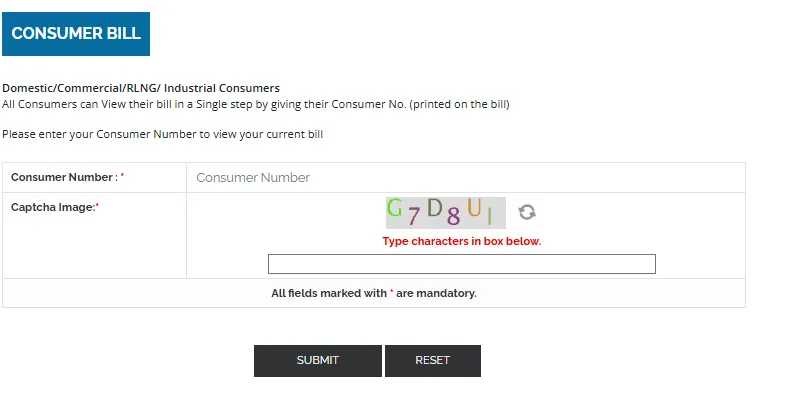
- Scroll to the Consumer Bill section.
- Enter your Consumer Number exactly as printed — no spaces, no dashes.
- Complete the CAPTCHA.
- Click Submit.
Your bill loads on screen with the amount payable, due date, billing month, and meter reading.
Two things worth knowing
- The CAPTCHA is case-sensitive. If it shows a mix of uppercase and lowercase characters, type them exactly as shown. Getting the case wrong is one of the most common reasons the form throws an error even when the Consumer Number is correct.
- Check the name on the bill. Once it loads, your name appears at the top. If you’re checking a bill for a rented property or one you’ve inherited from a previous owner, confirm the name matches who you expect — SNGPL bills can occasionally carry the previous consumer’s name if the connection was never formally transferred.
If the bill doesn’t load at all, it’s almost always one of: a mistyped digit, a bill that hasn’t been generated yet for your area this cycle, or the official site being slow (this tends to happen more near due dates, when traffic spikes).
11-Digit vs 14-Digit SNGPL Number
This is where a lot of people get stuck, and it’s worth clearing up properly because almost nothing online explains it clearly.
Your SNGPL bill actually carries more than one number on it, and they’re used for different things:
- Consumer Number / Account ID (11 digits) — this is what SNGPL’s own bill-check portal asks for. It’s printed near your customer details, usually top-right of the bill, and repeated on the payment slip. This is the number you use for the official online lookup described above.
- Reference Number / Bill Number (longer digit string) — this is what banks, JazzCash, Easypaisa, and other third-party payment channels usually ask for instead. It’s a different field on the same bill, typically found near the barcode or payment section.
If you’ve searched for a “14-digit” bill check and gotten confused, this is almost certainly why — you had the payment reference number in hand but the SNGPL portal was asking for the shorter Consumer Number, or vice versa. They are not interchangeable, and entering the wrong one in the wrong field is one of the most common reasons a bill check or payment fails to go through.
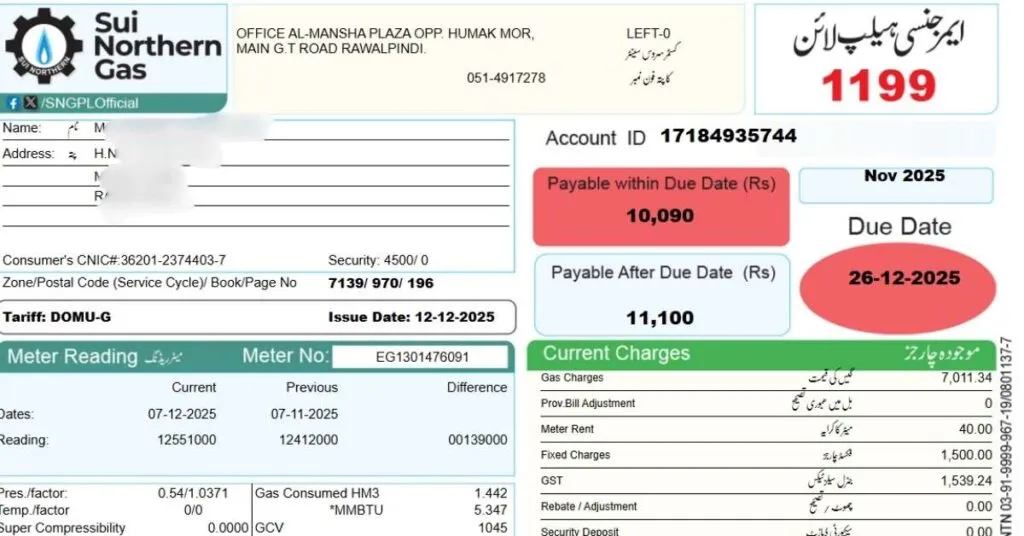
Quick way to tell them apart: the Consumer Number/Account ID is the one repeated in the customer information block at the top of the bill. The longer reference number tends to sit closer to the barcode or the payment stub at the bottom. If you’re not sure, both numbers are legitimate and printed clearly on every bill — just match the field you’re filling to the number’s actual label rather than guessing by length.
SNGPL Duplicate Bill Online — View, Download & Print
Lost your paper bill, or it simply never arrived? The online version isn’t a lesser copy — it’s generated from the same billing system and is accepted everywhere the paper bill would be, including at banks and payment counters.
Once your bill loads on the official portal:
- Use your browser’s Print option and choose Save as PDF to keep a digital copy.
- Print directly if you need a hard copy for over-the-counter payment.
- Take a screenshot if you just need the amount and due date for now.
One limitation to know: the online system generally only holds your most recent bill. If you need an older month for a dispute or a record, that usually means contacting SNGPL directly or visiting a regional office, since historical bills aren’t always retrievable through the same self-service lookup.
How To Get Your Bill Through Email
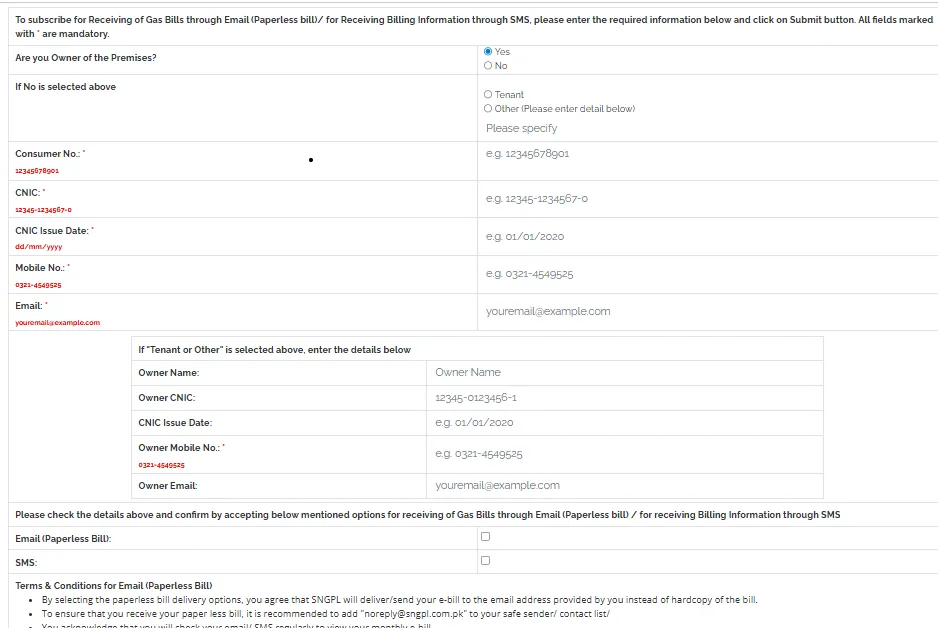
You can also get your SNGPL bill online by registering your email address with the company. So, you can get alert every month.
How to Read Your SNGPL Bill — Every Field Explained
Most guides stop at “enter your number and view the bill.” But once it’s in front of you, the bill itself is dense — full of abbreviations and line items that mean very little unless someone’s explained them. Here’s what’s actually on it.
Core identifiers:
- Account ID / Consumer Number — your 11-digit identifier, used for every lookup and complaint reference.
- Bill ID — a unique number for that specific bill/month, different from your Consumer Number.
- Meter Number — the physical meter’s ID, useful when reporting a faulty or damaged meter.
- Book/Page Number — an internal SNGPL reference tied to how meter readings are recorded for your area, mostly relevant if you’re filing a complaint and staff ask for it.
Consumption and pricing terms:
- HM3 — hundred cubic meters, the unit your actual gas consumption is measured in.
- MMBTU — million British thermal units, the unit SNGPL actually bills you on. Your HM3 reading is converted to MMBTU using the Gross Calorific Value (GCV) of the gas supplied to your area, since gas quality (and therefore its energy content) isn’t identical everywhere.
- GCV (Gross Calorific Value) — a measure of how much energy is in the gas you’re receiving. It varies by region and source, which is why the same HM3 reading can translate into a slightly different MMBTU figure — and a different bill — depending on where you live.
- Wobbe Index — a technical value related to gas interchangeability and combustion quality, printed on the bill mainly for regulatory transparency. It doesn’t directly change what you pay, but it’s there because OGRA requires gas quality data to be disclosed.
- Slab / tariff table — SNGPL bills domestic consumers on a tiered rate structure: the more you use, the higher the per-MMBTU rate on the additional units, similar to how electricity slabs work. Your exact rate per slab is set by OGRA and can change with each tariff notification, so always check the rate table printed on your own current bill rather than relying on an old figure.
Charges and adjustments you might not recognize:
- Fixed charges — a flat monthly charge applied regardless of how little gas you use, meant to cover the cost of maintaining your connection and meter infrastructure. This is why a bill can still arrive with an amount due even in a low-usage month.
- Security Deposit / Security Deposit Shortfall Installment — SNGPL periodically reviews whether your security deposit on file still matches current rates, and if it’s short, recovers the difference in installments added to your regular bill. This typically appears as a separate line explaining which installment number you’re on and how many remain.
- Adjustments — corrections carried over from a previous bill, often tied to a meter reading correction or a billing error resolved after a complaint. If your bill mentions “adjustments, details of which are available on request,” that’s your cue to ask your regional office for the breakdown if the amount looks unclear.
- Arrears — any unpaid balance carried forward from a previous bill.
- Disconnection notice — printed when a bill remains unpaid past a certain point; it doesn’t mean you’re already disconnected, but it is a warning that action follows if the bill stays unpaid.
Two terms you’ll hear from SNGPL staff but rarely see explained anywhere consumer-facing:
- Provisional Billing — used when your actual meter reading couldn’t be recorded for that cycle (meter access issue, fault, or reading delay), so SNGPL estimates the bill based on historical usage. Provisional bills are usually adjusted once an actual reading is taken.
- Sticky Case — internal SNGPL terminology for a billing account flagged with an unresolved discrepancy — often a mismatch between recorded and actual consumption — that needs manual review before it clears. If your billing officer mentions your account is a “sticky case,” it means it’s sitting in a manual review queue rather than processing normally.
Protected vs Non-Protected Category, Explained
This is the single most common complaint among SNGPL consumers, and it comes up constantly in consumer discussions — bills that jump sharply from one month to the next with no obvious change in usage.
The protected/non-protected category is usually the reason. SNGPL classifies domestic consumers into a protected category (lower, capped rates) and a non-protected category (higher rates) based on consumption thresholds set by OGRA. If your usage crosses that threshold — even briefly, even in one high-usage winter month — you can be moved into the non-protected slab, and the difference in your bill can be dramatic.
What to actually check if your bill spiked:
- Which category you’re billed under, printed on the bill itself, and whether it matches your genuine average usage over the past several months rather than just one unusually high month.
- Whether the reading is actual or estimated. A string of estimated (provisional) readings followed by one large “catch-up” actual reading is a common pattern behind sudden spikes — you’re not using more gas, you’re just being billed for a backlog at once.
- Seasonal usage. Gas consumption for heating rises sharply in winter (roughly November through February) across Punjab, KPK, and Islamabad. A bill that looks alarming in January may simply reflect real seasonal usage rather than an error — worth comparing to the same month last year rather than to last month.
- Meter reading consistency. If the reading on your bill doesn’t match what you can see on the meter itself, that’s worth a direct complaint rather than an assumption of error, since it could be a meter fault or a genuine reading mistake.
If, after checking all of this, you still believe you’ve been wrongly placed in the non-protected category or overbilled, that’s a formal complaint, not something the online bill-check tool itself can fix — see the complaints section below.
SNGPL Online Bill Payment — All Methods
Once you’ve confirmed the amount, you have a few ways to actually pay:
- Bank apps and internet banking — most major Pakistani banks list SNGPL/Sui Gas as a billing category under their utility payment section.
- Mobile wallets — JazzCash and Easypaisa both support SNGPL bill payment; you’ll typically need the reference number from the bill (see the digit-length section above) rather than the Consumer Number.
- Over-the-counter — designated bank branches and payment centers still accept cash payment against a printed or downloaded copy of the bill.
- If a payment doesn’t reflect immediately — this is common enough that it’s not automatically a sign something went wrong. Give it a couple of business days, keep your payment receipt or transaction ID, and if it still isn’t reflected after that, raise it directly with SNGPL rather than assuming it’s lost.
SNGPL Bill Errors, Overbilling & Complaints — How to Fix It
If your bill is wrong — overbilled, wrong category, faulty meter, a payment that didn’t update, or arrears you’ve already cleared — here’s the actual escalation path.
Step 1 — SNGPL directly
- Call the SNGPL helpline: 1199 (available 24/7).
- Or file online: go to sngpl.com.pk → Customer Services → Lodge Complaint, and select the relevant billing category.
- Keep your Consumer Number and complaint reference number saved — you’ll need both if you escalate later.
- For a faulty or damaged meter specifically, report it as soon as you notice inconsistent readings; a confirmed faulty meter is one of the more straightforward complaint categories to get resolved since it’s independently verifiable.
Step 2 — OGRA (if unresolved within a reasonable window)
- OGRA (Oil and Gas Regulatory Authority) is the regulator overseeing SNGPL and can direct it to investigate or correct a billing dispute.
- Complaints can be filed through OGRA’s own grievance channel, referencing your original SNGPL complaint number.
Step 3 — Wafaqi Mohtasib (Federal Ombudsman)
- If OGRA and SNGPL both fail to resolve the issue, the Wafaqi Mohtasib’s office accepts complaints against public utilities and has the authority to direct SNGPL to correct or compensate.
Realistic timelines: simple billing corrections can move within a couple of weeks; anything involving a meter replacement, lab testing, or a field visit tends to take longer — sometimes a month or more. Following up roughly every 48 hours, rather than waiting silently, tends to keep a complaint moving.
Bill or connection in the wrong name? If you’ve moved into a property and the bill still shows a previous owner or tenant, that’s a name-transfer request, handled through your regional SNGPL office with proof of ownership/tenancy and the existing Consumer Number — it isn’t something the online bill-check tool can change on its own.
SNGPL Bill Online Check — By City
The bill-check process is identical everywhere SNGPL operates, but a few things vary by region — office contacts, and occasionally local supply conditions during peak winter demand.
Lahore — one of SNGPL’s largest consumer bases; high-density residential areas here are also where category-misclassification complaints (protected vs non-protected) come up most often in consumer discussions.
Islamabad — mixed residential and government-sector consumers; same 11-digit lookup applies.
Rawalpindi — served alongside Islamabad under the same regional structure.
Faisalabad — significant industrial and domestic mix; industrial consumers fall under separate tariff categories from domestic ones.
Multan — standard domestic lookup process; regional office handles name-transfer and meter complaints locally.
Peshawar — part of SNGPL’s KPK service area; historically one of the regions where consumers have raised meter-reading discrepancy complaints.
Gujranwala, Sialkot, Sargodha — smaller consumer bases within the same Punjab network, same process applies.
If your connection is in Sindh or Balochistan, you’re an SSGC consumer, not SNGPL — the process is similar but on a separate portal.
Frequently Asked Questions
This page is independently maintained and is not affiliated with, endorsed by, or officially connected to Sui Northern Gas Pipelines Limited or any government entity. All bill data is retrieved directly from official SNGPL systems. For official billing disputes, contact SNGPL at 1199 or visit sngpl.com.pk.