
Sui Gas Application Check by CNIC Number: Track Status
You applied for a new gas connection. Now you are checking your phone every day, hoping for good news. You are not alone. Thousands of people across Punjab, KPK, and Islamabad are waiting for the same update right now.
You can do a sui gas application check by CNIC number on the official SNGPL website, on the ConnectOn app, by calling 1199, or by sending an SMS. Each method takes less than five minutes. Below, we explain every method in plain words, show you what each status message means, and tell you exactly what to do if your file gets stuck.
Which company handles your area?
SNGPL covers Punjab, KPK, Islamabad and Azad Kashmir. SSGC covers Sindh and Balochistan. Each uses a different official tracking field, so pick yours below.
SNGPL’s official tracking form asks for your Application Reference Number, not your CNIC — it’s the number you were given when you first submitted your application. We check the format here, then take you straight to SNGPL’s real portal to complete the lookup. We never see or store your result.
This opens sngpl.com.pk‘s official application-status page in a new tab,
with your reference number ready to paste in. You’ll still need to enter the captcha
shown on their site — that step can only be completed on SNGPL’s own page.
Don’t have your reference number, or applied using CNIC instead? Call
1199 and an agent can look it up using your CNIC directly.
Prefer to go there yourself? Open the official SNGPL portal.
If the page freezes after you enter the captcha, this is a known server issue, not a problem with your application. Refresh, try desktop mode, or call the free helpline 1199 and read out your CNIC to an agent instead.
Paste in the status SNGPL showed you
Pick the message closest to what appeared on your screen. We’ll explain what it means in plain words and what to do next.
We wrote this guide after reading real complaints from Reddit, Facebook groups, and dozens of SNGPL user comments. So this is not a copy-paste guide. It answers the real questions people are asking in 2026.
You can also click here to check your Gas Application Status
Click to Check SSGC New Gas Connection Application Status
Last updated: August 2026. We check this page every month because SNGPL rules and fees change often.
- Sui Gas BillS
- NGPL Online Bill
- SSGC Duplicate Bill
- Gas Bill Calculator
- SNGPL New Gas Connection: Apply Online for Punjab, KPK & Islamabad (2026)
What Does “Gas Application Status” Actually Mean?
When you apply for a new Sui gas connection, SNGPL does not install your meter the same day. Your file moves through several stages first. A survey team checks your street. Then the company sends you a bill for charges. Then a contractor fits your gas line. Only after all this does your meter get installed.
Your “application status” is simply a label that tells you which stage your file is at right now. Checking this status regularly helps you catch important deadlines, like paying your demand notice on time.
Sui Gas Application Check by CNIC Number: Step by Step
This is the most common way people check their file. Here is how it works.
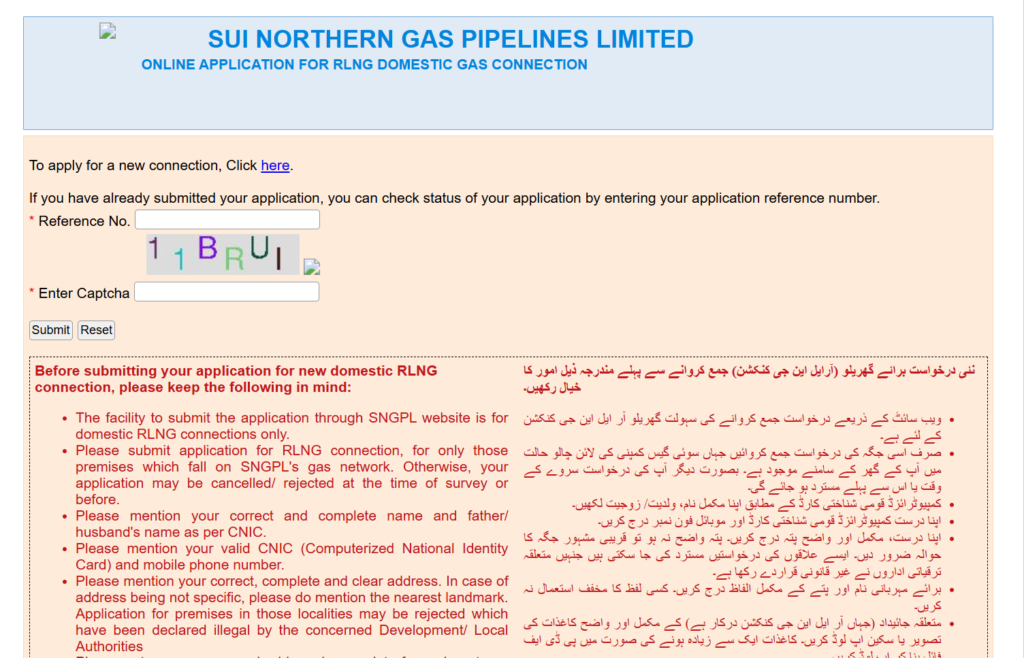
- Open your browser and go to the official SNGPL website, sngpl.com.pk.
- Click on Customer Services, then Online Services.
- Look for Track Your Application or Status of New Connection.
- Choose your application type: Domestic, Special Domestic, Commercial, or Housing Society. Most home users should pick Domestic.
- Type in your CNIC number or your application reference number. Do not add dashes.
- Enter the captcha code exactly as shown.
- Press Submit.
Your screen will now show your name, address, and current status. You can also print this page and take it to your local SNGPL office if you need help in person.
A word of caution: several users report that this page sometimes freezes after you enter the captcha and press submit. This is a known glitch, not something wrong with your application. We cover the fix for this in the troubleshooting section below.
Sui Gas Application Check Online: All the Methods Compared
You do not have to use only the website. SNGPL gives you five ways to do a sui gas application check online. Pick whichever suits you best.
| Method | What You Need | Best For | Cost |
|---|---|---|---|
| Website (sngpl.com.pk) | CNIC or reference number | People with internet access | Free |
| ConnectOn mobile app | CNIC, reference number, or Account ID | Frequent checkers | Free |
| Helpline 1199 | CNIC (reference number helps) | People who prefer to talk | Free |
| SMS to 0921 | Application number | Areas with weak internet | Standard SMS rate |
| Office visit | CNIC and reference number | Files stuck for weeks | Free (only travel cost) |
Checking Through the ConnectOn App
Search for SNGPL ConnectOn on the Google Play Store or Apple App Store. Make sure you download the official app with the SNGPL logo, since fake copies do exist. Open the app, log in, and go to Application Status. You can also check your bills and file complaints from the same app.
Checking by Calling 1199
Not everyone wants to use a website. If that is you, just call 1199 from any phone in Pakistan. This call is free. Tell the agent you want to check your new connection application status, and give them your CNIC. If your area has its own regional number, that also works, and we list Rawalpindi and Islamabad numbers later in this guide.
Checking by SMS
If your internet is weak or you have no data package, type your application number into a text message and send it to 0921. You will get a reply with your current status. This method is useful in rural areas where the SNGPL website loads slowly.
Sui Gas Online Application vs. Status Check: Know the Difference
Many people confuse these two things, so let us clear this up.
- Sui gas online application means submitting a brand-new request for a gas connection.
- Sui gas application status check means checking on a request you already submitted.
If you have not applied yet, go to the SNGPL online application portal and fill in your details, address, and CNIC. If you already applied, you do not need to fill anything new. You only need your CNIC or reference number to check where your file stands.
Sui Gas Application Status Check: What Each Status Message Means
This is the part that confuses most people. When you check your status, SNGPL shows you a short phrase. Here is what each one really means, in simple words.
| Status You See | What It Means | What You Should Do |
|---|---|---|
| Application Received / Submitted | Your form and documents are in the system. | Nothing yet. Wait for the survey. |
| Under Process / Survey Pending | A team will visit your home soon to check the gas line distance. | Keep your phone on and your address easy to find. |
| Demand Notice Issued / Pending Payment | Your application is approved. SNGPL has told you the amount to pay. | Pay this amount quickly at the bank named on the notice. |
| Work Order Issued | Your payment is confirmed. A team is now assigned to fit your meter. | Wait for the installation team to contact you. |
| Meter Installed / Commissioned | Your gas connection is active. | You can start using gas. Billing begins now. |
| Rejected / Not Feasible | The gas line does not reach your street, or a detail did not match. | Call 1199 to ask why, and how you can fix it. |
Simple tip: if your status has not changed for more than four weeks, do not just keep refreshing the page. Move to the next step, which we explain below.
Gas Application Status: Why the Wait Feels So Long in 2026
Here is something most guides do not tell you honestly. After SNGPL reopened new connections, the company received over 700,000 applications. That is a huge number for any office to process. Around 400,000 of these came through the Fast Track option, and 300,000 came through normal processing.
This backlog is the real reason your status might not move for months, even though the official website does not say this clearly.
- Normal processing is officially said to take one to two years. In practice, many users report it taking two to three years.
- Fast Track (with the extra urgent fee) is officially said to take three to four months. In practice, many users are seeing six to twelve months in 2026.
We are telling you this so you know it is not just your file that is slow. It is a nationwide situation. Being aware of this can save you a lot of stress.
How to Track Gas Application Status When the Website Gets Stuck
This is a real, common problem. Many users type in their CNIC or reference number, enter the captcha, press submit, and then the page just freezes. It does not move forward or backward.
If this happens to you, try these steps in order:
- Refresh the page and try again. Sometimes it is just heavy website traffic.
- Switch to desktop mode in your phone browser. Some users report this works better than mobile view.
- Try a different browser or clear your browser’s cache.
- Wait an hour and try again, especially if it is during office hours when many people are checking at once.
- Call 1199 directly. If the website keeps freezing, this is the fastest working option. Give the agent your CNIC and reference number, and they will read out your status from their internal system.
This glitch is common enough that it should not worry you. It usually means the server is busy, not that something is wrong with your file.
What to Do If Your Sui Gas Application Status Is Not Updating
It is normal to feel worried when nothing changes for weeks. Here is a simple decision path to follow.
- Stuck for 1–2 weeks: This is still normal. Just keep checking every few days.
- Stuck for 3–4 weeks: Call 1199 and ask for a status update. Have your CNIC and reference number ready.
- Stuck for more than 4 weeks: Visit your nearest SNGPL office in person. This is the strongest option, because office staff can see internal notes on your file that the website and even the 1199 agents cannot always see.
- No record found at all: Double-check your CNIC number for a typing mistake. This is the number one reason files show “no record found.” If your CNIC is correct and still nothing shows, you may have applied on paper through an agent, and your file may not be entered online yet. Call 1199 to confirm.
- Demand Notice issued but you already paid: Keep your bank receipt safe. If your meter is still not installed after a long time, take this receipt to your local office and ask for a written update.
Important warning: never pay any extra money to an agent or middleman to “speed up” your file. This is not allowed by SNGPL, and it will not actually help. Only pay the amount written on your official demand notice, at the bank named on it.
Rawalpindi and Islamabad: Local Numbers and Offices
If you live in Rawalpindi or Islamabad, you share the same SNGPL regional zone. This means you can use these local numbers along with the national helpline.
- Rawalpindi/Islamabad regional complaint number: 051-9257710-11 or 051-9257713-19
- Rawalpindi-specific number: 051-491727
- National helpline (works everywhere): 1199, free and open 24 hours
If your application was submitted in areas like Bahria Town Rawalpindi or other newer housing societies, keep in mind that some of these areas fall under network extension rules if the gas line has not yet reached your street. If your status shows “Not Feasible,” this is often the reason, and you should ask your local office whether a network extension application applies to you.
Documents You Will Need for Checking and Applying
Keep these ready before you check your status or apply for a new connection:
- Your 13-digit CNIC number, with no dashes or spaces
- Your application reference number or tracking ID, if you have it
- The mobile number you used when you applied
- Your Account ID, if your connection was previously registered under one
You do not need a password for a basic status check. If you are applying fresh, you will also need property ownership proof, a neighbor’s gas bill or nearby customer number, and other documents listed on the official SNGPL portal.
New Connection Fees in 2026 (What You Should Actually Pay)
Be careful here, because many websites list different numbers. Always trust the amount written on your official demand notice over any number you read online, including this page. That said, here is a general guide based on official patterns.
| Item | Approximate Amount | Notes |
|---|---|---|
| Application submission | No fee | Submitting your form online is free. |
| Security deposit | Around Rs. 20,000 | Refundable. Can change based on your gas load. |
| Service line charges | Rs. 1,500 (up to 10 marla) or Rs. 3,000 (above 10 marla) | Based on plot size. |
| Fast Track / urgent fee | Around Rs. 25,000 | Optional. Pay only if you want to skip the normal queue. |
RLNG gas, which almost all new connections now use, costs more per unit than the older system gas. Even so, for most homes it still works out cheaper than buying LPG cylinders every month.
Common Mistakes People Make While Checking Their Status
- Typing the CNIC with dashes when the system wants only numbers
- Checking too often in one day, which does not speed anything up
- Applying by hand through an agent and expecting the same online tracking speed
- Ignoring a “Demand Notice Issued” message and missing the payment deadline
- Paying extra money to someone who claims they can “fast-track” your file outside official channels
Avoiding these small mistakes can save you weeks of confusion.
Frequently Asked Questions
Can I do a sui gas application check by CNIC number without a reference number? Yes. Your CNIC alone is enough on the website and on the 1199 helpline. A reference number helps, but it is not always required.
Is checking my gas application status free? Yes. Checking through the website, the app, or by calling 1199 is free. Only the SMS option may cost your normal text message rate.
Can I check my status using my Account ID instead of CNIC? Yes, if your file was earlier connected to an Account ID, you can use this on the ConnectOn app or by asking a 1199 agent to search with it.
What does “Demand Notice Issued” mean, and what should I do? It means your application is approved and SNGPL has calculated your charges. Pay this amount quickly at the bank shown on the notice, since delays can push your file back in line.
Why does my status show “No record found”? The most common reason is a wrong digit in your CNIC. Remove all dashes and spaces and try again. If it still fails, your application may have been submitted on paper and not yet entered into the online system.
How long does the whole process really take in 2026? Officially, normal processing takes one to two years and Fast Track takes three to four months. In real cases, because of the current backlog of over 700,000 applications, normal processing is closer to two to three years, and Fast Track is closer to six to twelve months.
I applied through an agent and my file is not showing online. What now? Give it a little time first, since paper applications take longer to appear online. Then call 1199 with your CNIC and ask them to confirm it is in the system.
What should I do if the SNGPL website freezes when I check my status? Try refreshing, switching to desktop mode, or using a different browser. If it still freezes, call 1199 directly and give them your CNIC and reference number.
Should I pay someone to speed up my gas connection application? No. Never pay an agent or middleman for this. It is against SNGPL rules, it will not actually help, and you could lose your money. Only pay the exact amount on your official demand notice.
Final Word
Waiting for a new gas connection is stressful, especially with the current backlog. But checking your status the right way, and knowing what each message means, puts you back in control. Use the official website or app for quick checks, call 1199 when you need a human to confirm something, and visit your local office in person if your file has been stuck for more than a month.
Bookmark this page. We update it every month, so you can always come back to check the latest fees, timelines, and steps.
This guide was written and reviewed by our Consumer Rights Editorial Desk. We are an independent publication and are not affiliated with SNGPL, SSGC, or any government department. All fees and timelines mentioned above are approximate and based on publicly available information as of August 2026. Always confirm final amounts using your official demand notice.

